
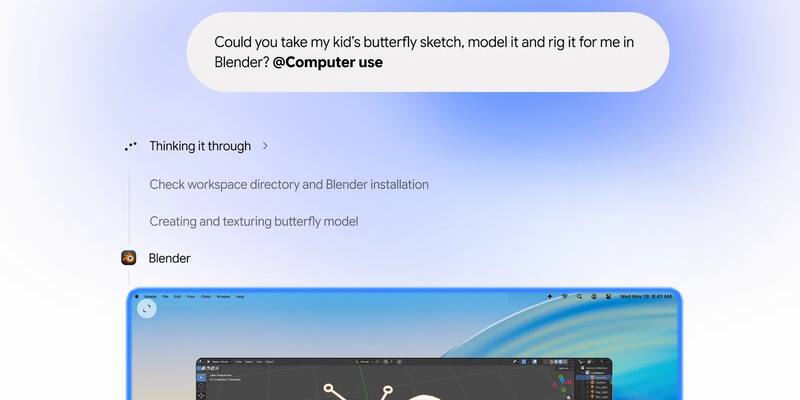
Google’s launch artwork for computer use in the Gemini app for Mac, November 19, 2026, showing its Blender demo. Image: Google
Google’s Gemini can now do the clicking for you on a Mac. The Gemini app for Mac has gained computer use, Google said on Thursday, so its AI can work through desktop apps, local files and websites by itself to finish multi-step jobs, from filling in shipping forms to turning a child’s drawing into a 3D model in Blender.
What Gemini can do on your Mac
You describe the job and Gemini handles the clicks, typing, menus and forms that would normally take dozens of steps. In Google’s launch demo, a parent types “Could you take my kid’s butterfly sketch, model it and rig it for me in Blender?” and tags the request “@Computer use”. Gemini checks the workspace folder and the Blender installation, then builds and textures the butterfly in the 3D app.
Michael Friedman, a group product manager on the Gemini app, gave four other examples in his post:
- Creative work: batch colour-grading photos in design software, or setting up complex 3D scenes.
- Form filling: pulling weights, dimensions and addresses out of local PDFs to fill in multi-box shipping quotes.
- Presentations: gathering metrics and screenshots from live dashboards for several regions and building a deck in Google Slides.
- Selling things: analysing clothing photos in a folder, researching prices and staging listings on resale sites.
Google hasn’t said which Gemini model runs the feature. It launched its faster Gemini 4 Neon model earlier on Thursday.
“Your main screen and cursor remain completely free”
Unlike agents that take over your pointer, Gemini works in a separate window of its own, out of sight, and streams a live preview of what it is doing into your chat. Friedman put the pitch like this:
Gemini works inside an isolated background window with a live preview right in your chat. Your main screen and cursor remain completely free, so you can keep typing, designing, or taking calls without interruption.
Michael Friedman, Group Product Manager, Gemini App, Google
On safety, Google lists four controls: you choose which apps Gemini can reach, you can watch every step live, you can pause it at any time, and it asks you to approve “key actions” before it takes them. Google hasn’t said which actions count as key, or how much of your Gemini usage limits a long task uses.
The post also says nothing about prompt injection, where a web page hides instructions for an AI agent to follow. On the same day, Google described the fake copy of the internet it built to attack Chrome’s own browsing agent with exactly that kind of trick, but it hasn’t said whether the Mac feature went through the same tests.
Who gets it: plans, countries and Macs
Computer use is rolling out now, in English, in the US only. Google gave no dates for the UK, Canada, Germany, Australia or anywhere else, and its post mentions only the Mac app, not the Gemini app for Windows. To use it you need:
- A Mac with Apple silicon running macOS Sequoia (15.0) or later. Intel Macs are left out.
- A personal Google account, and you must be 18 or over. Work and school accounts aren’t included.
- A paid Google AI Plus, AI Pro ($19.99 a month in the US) or AI Ultra (from $99.99) plan. Free Gemini users don’t get it.
The app is a free download from gemini.google/mac.
How it stacks up against Claude and ChatGPT
Google is catching up rather than leading. Anthropic’s Claude Cowork already works with local files and apps on the desktop, and its Dispatch feature lets you message Claude from your phone to set it to work on your computer, though a researcher found a flaw in Dispatch that Anthropic hasn’t fixed. OpenAI’s ChatGPT can click around in your Chrome tabs and fill in forms, and ChatGPT Work runs in its Mac and Windows apps. Perplexity’s agent can now run entirely on a Mac.
Apple, meanwhile, is wary of all of them. In October it said it would add new Full Disk Access controls because AI agents make the setting riskier, which could shape how much of your Mac Gemini and its rivals are allowed to see.
Why it matters
Every big AI lab now wants its assistant to use your computer, not just talk about it, and Gemini’s Mac app puts Google’s version in front of paying US users. Its background window is a real point of difference, but with unclear approval rules and no word on prompt injection, users are trusting Google’s safeguards on faith for now.
Sources: Google (blog post by Michael Friedman); Google Gemini Help (Mac app requirements).
Latest Google news