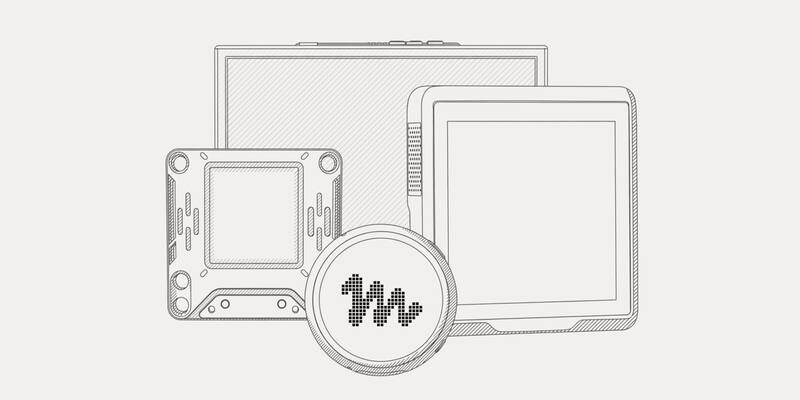
Meta’s artwork for Muse Gadgets, with Muse Home Link in front. Image: Meta
Meta will send a small USB-C gadget to Muse subscribers in the United States for free, so its Muse AI agent can switch on lights, control a TV or send something to a printer on their home network. The Muse Home Link launched on Friday alongside a new Muse Gadgets site, where Meta has open sourced the software for anyone to build their own Muse hardware.
“Free with an active Muse subscription in the United States only, limit one per subscriber,” the page says. “Ships in October, first come, first served.”
What is Muse Home Link?
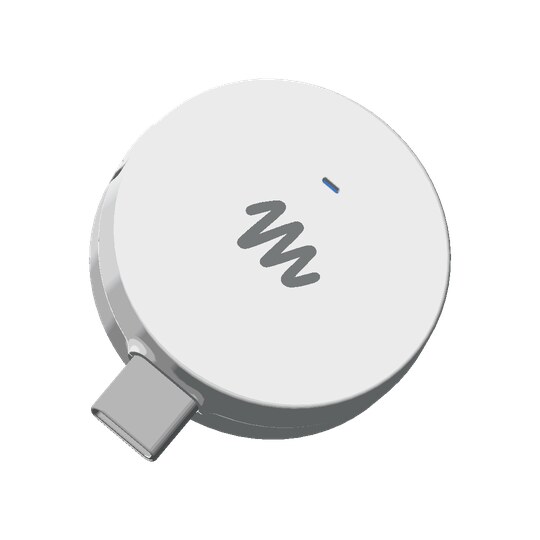
Home Link is a puck about the size of a large coin (35 by 42 by 10 millimetres) that plugs into any USB-C or USB-A power source near your router. You pair it with the Muse app over Bluetooth, pick the Wi-Fi network it should join, and it then stays on your network so Muse, which normally runs in Meta’s cloud, can reach devices in your home.
Inside is an Espressif ESP32-C5 chip with 8MB of memory and 8MB of storage, Wi-Fi 6 on both 2.4GHz and 5GHz, and a single status light. Meta says the firmware is based on its open source ESP32 software, but the Home Link itself “only runs official firmware and can’t be reflashed”.
What can Muse do with it?
That depends on “skills”, small add-ons written by the community rather than by Meta. Meta lists Philips Hue, Sonos, Apple TV, Google Nest speakers and Samsung TVs among the popular ones, installed from its GitHub page, and says Home Link can also reach “anything you build with a local HTTP API”.
Meta is unusually blunt about the limits. Skills “can change or break”, it says: “Have fun with them, but don’t rely on them for anything safety-critical like home security, emergencies, or medical needs.” That matters for an agent that has already shared a user’s home address with a stranger on Facebook Marketplace.
How to claim a free Muse Home Link
- Go to gadgets.muse.ai/home-link and choose “Claim your Muse Home Link”.
- Log in with your Muse account if asked.
- Wait for Meta to tell you it’s ready to ship. “Claiming holds your place in line; it isn’t an order,” the form says.
Two things aren’t clear yet. Meta doesn’t say whether the free Muse plan counts as “an active Muse subscription”, or whether you need one of the paid plans, Power at $20 a month or Maximum at $100 a month (our Muse explainer covers what each includes). It also hasn’t said how many units it has. And although Muse works in the US and Canada, the offer is US-only, so Canadian subscribers miss out for now. Muse still isn’t available in the UK or the EU; our Muse UK guide tracks that.
Build your own Muse gadget
The bigger idea is the open source kit behind it. Meta has released SDKs for ESP32 boards and for Raspberry Pi and other Linux computers on GitHub under the Apache 2.0 licence, so hobbyists can connect Muse to “displays, buttons, sensors, actuators, and whatever else you’ve got lying on your workbench”. It’s “built by hackers, for hackers, just for fun”, Meta says, with a warning that side effects “may include bricked boards, voided warranties, brownouts, or bankruptcies”.
Its example projects use boards you can buy today from other companies: a round Waveshare touch screen with push-to-talk, a pocket M5Stack StickS3, the AiPi Lite desk companion, a Seeed colour e-ink display for a morning briefing, the Home Assistant Voice Preview Edition, and a Raspberry Pi 5 for Home Assistant and other Linux jobs. A stick that plugs into a TV’s HDMI port is listed as “coming soon”. Each gadget needs an SDK token from Meta and pairs through the Muse app after you turn on developer mode.
It follows Muse Charm, the keychain gadget Meta unveiled at Connect last month, and gives Meta another way to get Muse into homes without going through Apple’s or Google’s phones.
Why it matters
Agents are only as useful as what they can reach, and the home has been the hard part. A free puck on the router, plus a community writing the integrations, is a cheap way for Meta to get Muse controlling real devices in US homes, and a test of how much people will trust an AI agent with their lights, speakers and TVs.
Frequently asked questions
Is Muse Home Link free?
Yes, for people in the United States with an active Muse subscription. Meta says it’s limited to one per subscriber and will ship in October, first come, first served.
How do I claim a Muse Home Link?
Go to gadgets.muse.ai, choose “Claim your Muse Home Link” and log in with your Muse account. Meta says claiming holds your place in line but isn’t an order, and it will tell you when the device is ready to ship.
Does the free Muse plan count?
Meta hasn’t said. Its page says the gadget is free “with an active Muse subscription” and available to “Muse subscribers”, without saying whether that includes the free plan or only the paid Power and Maximum plans.
How much is a Muse subscription?
Muse has a free plan with a weekly usage allowance, and two paid plans: Power at $20 a month and Maximum at $100 a month.
Can I get Muse Home Link in Canada or the UK?
Not at the moment. The offer is for the United States only, even though Muse itself also works in Canada. Muse isn’t available in the UK or the EU yet.
What devices does Muse Home Link work with?
It lets Muse reach devices on your home Wi-Fi through community-built skills. Meta lists Philips Hue, Sonos, Apple TV, Google Nest speakers and Samsung TVs among the popular ones, plus anything with a local HTTP API.
Can I build my own Muse gadget?
Yes. Meta has open sourced SDKs for ESP32 boards and for Raspberry Pi and other Linux computers under the Apache 2.0 licence. You need an SDK token from gadgets.muse.ai to pair a gadget with the Muse app.
Sources: Meta: Muse Home Link, Muse Gadgets and the Muse Gadgets SDK on GitHub (October 2, 2026).
Latest Meta news