The Roblox Studio and Claude Code logos (illustrative). Image: Roblox Studio logo (Simple Icons, CC0; Roblox trademark) and Claude Code logo (Anthropic)
You can build a Roblox map for your kids with AI by switching on the MCP server built into Roblox Studio, connecting Claude Code to it, and then describing the map in plain English: Claude places the parts, writes the scripts and even playtests the game while you watch. You don’t need to know Luau, Roblox’s coding language. You do need a Windows or Mac computer, a paid Claude plan and about 15 minutes to set it up. Here’s how, from install to the moment your child spawns into their own obby.
What you need to make a Roblox map with AI
Everything except Claude is free:
| What | Details | Cost |
|---|---|---|
| A computer | Windows or Mac. Roblox Studio doesn’t run on iPads, phones or Chromebooks | n/a |
| Roblox Studio | The latest version, signed in with your own Roblox account | Free |
| Claude Code | Needs a Pro, Max, Team or Enterprise plan, or a Claude Console account with API credits | Pro is $20 a month in the US |
The Claude account should be yours, not your child’s: Anthropic’s consumer terms require users to be 18 or over. That still leaves the best job for the kids: deciding what goes in the map and testing every version.
Step 1: install Claude Code
Claude Code runs in a terminal. Open Terminal on a Mac (or PowerShell on Windows), paste the command from Anthropic’s setup page and press Enter.
On a Mac:
curl -fsSL https://claude.ai/install.sh | bashOn Windows, in PowerShell:
irm https://claude.ai/install.ps1 | iexWhen it finishes, open a new terminal window, make a folder for the project, go into it and type claude. The first time, it opens your browser so you can sign in to your Claude account. Anthropic’s setup page says the free Claude plan doesn’t include Claude Code, so you’ll need Pro or above.
Step 2: connect Claude Code to Roblox Studio (the MCP server)
Roblox Studio has its own MCP server built in, so you no longer need a third-party plugin. MCP (Model Context Protocol) is the standard way AI tools talk to other apps. Once it’s on, Claude can look around your place, write scripts, run code, insert models and press Play.
- Open Roblox Studio and create a new place from the Baseplate template (or open a place you already have).
- Open Assistant, click the … menu, then Manage MCP Servers.
- Switch on Enable Studio as MCP server.
- Under Quick connect, switch on Claude Code. If it isn’t listed, install Claude Code first and restart Studio.
- Close Claude Code if it’s open and start it again with
claude.
Type /mcp in Claude Code: you should see Roblox_Studio listed as connected, and Studio shows a green dot with the number of connected clients.
If quick connect doesn’t work, add the server by hand. These use the paths from Roblox’s documentation:
# Mac
claude mcp add Roblox_Studio -- /Applications/RobloxStudio.app/Contents/MacOS/StudioMCP

# Windows
claude mcp add Roblox_Studio -- cmd.exe /c %LOCALAPPDATA%\Roblox\mcp.bat
Step 3: describe the map (prompts that work)
Now the fun part. Ask your kids what they want, then type it in as plainly as they said it. Some starting points:
- Obby: “Build a 20-stage obby on the baseplate for a seven-year-old. Start easy, add checkpoints every five stages, lava parts that send you back to the last checkpoint, and a trophy at the end.”
- Treasure island: “Make a small tropical island with a beach, palm trees, a wooden pier and five hidden chests. Show a message saying how many chests are left.”
- Maze: “Build a hedge maze with one exit, a few dead ends and a fountain in the middle.”
- Race track: “Make a looping race track with a start line, a lap counter and two jumps.”
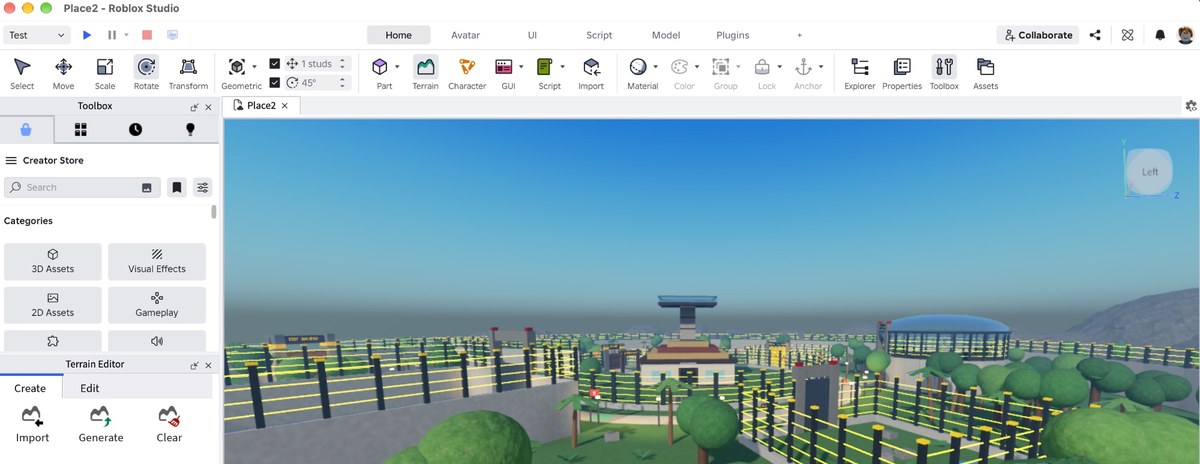
A few tips make a big difference:
- Ask for a plan first. Start with “Plan this before building anything” and read the plan with your kids before saying go.
- Build in stages. Ask for the layout first, then the scripts (checkpoints, coins, timers), then the decoration. Small steps go wrong less often and use less of your Claude allowance.
- Let it playtest. The MCP server lets Claude start and stop play mode, read the output console, take screenshots and walk the character around. Ask it to “playtest stage 4 and fix anything you can’t jump across”.
- Save as you go. Use File, then Save to File (or publish, below) before a big change, so a bad idea is easy to undo.
Claude can also generate 3D models and materials and pull free models from the Creator Store through the same connection, the way a solo developer had Claude build every model in his Steam fishing game through Blender’s MCP server. Long building sessions use a lot of tokens, so if you hit your limit, see how to make Claude Code limits last.
Step 4: let your kids play the map
There are two ways, and neither makes the game public.
On your computer: press Play in Roblox Studio and hand over the keyboard. Nothing is published and no other account is involved. This is the simplest option for younger children.
On their own device: publish the game with File, then Publish, give it a name and click Save. Roblox’s publishing guide says new games are private by default: only you and people with edit access can get in. Then use File, then Invite early testers to invite up to 10 friends, such as your child’s account, and they can play it on a phone, tablet, console or computer. Roblox began rolling out early tester invites in October 2026, so if you don’t see the option yet, use Play in Studio for now.
Your child’s account has to be on your friends list, within Roblox’s age rules. Roblox said in April 2026 that parents with a linked parent account who are already their child’s friend are upgraded to Trusted Friend automatically. Testers under 16 can’t preview a game rated above the maturity level their parent allows.
Don’t release it to everyone unless you mean to: going public means an age check on your own account and a content maturity question.
Is it safe to let Claude control Roblox Studio?
Roblox’s own warning is short: “MCP clients can read and modify content in your open Roblox places. Make sure to only connect clients you trust.” In practice:
- Claude Code asks before it uses a tool unless you’ve told it not to, so you can watch every change and say no.
- Work in a new place made for the project, not a game you care about.
- If Claude pulls a free model from the Creator Store, ask it to show you any scripts inside it before you publish.
- The MCP server only reaches places open in Studio on your computer, and its web tool only fetches Roblox documentation pages.
Roblox Studio MCP not working or not connecting
- Restart both. Roblox’s first fix is to restart Studio and Claude Code.
- Update Studio. The server needs the latest version.
- Open a place. Claude can only work in a place that’s open in Studio. If you have more than one open, tell Claude which one to use.
- Check the path. If you added it by hand, check the file in the command above exists. Run
claude mcp listin your terminal to see whether it says Connected or Failed to connect. - Claude Code not listed in quick connect. Install Claude Code, then restart Studio.
- Login problems. See Claude Code “Login expired” errors.
Where it works: US, UK, Canada, Australia, Germany and more
Roblox Studio is free wherever Roblox is available, though Roblox itself is blocked in a handful of countries. Claude Code works in Anthropic’s supported countries, which include the US, UK, Canada, Australia, Germany and the rest of the EU, India and most of the world, but not China or Russia. Claude Pro is $20 a month in the US ($17 a month billed annually), with local prices and tax elsewhere. Roblox Studio also has its own built-in AI helper, Assistant, which can build and script without Claude Code, and Google’s new Playground turns a sentence into a browser game, though not a Roblox one.
Last checked: October 18, 2026, against Roblox’s Studio MCP server and publishing documentation, Roblox’s April 2026 Trusted Friends announcement and Anthropic’s Claude Code setup page.
Frequently asked questions
Can Claude make a Roblox map?
Yes. Claude Code can build a map inside Roblox Studio through Studio’s built-in MCP server, which lets it place and change parts, write Luau scripts, run code and playtest the game while you watch. You turn the server on in Studio under Assistant, then … and Manage MCP Servers.
Is the Roblox Studio MCP server free?
The MCP server is built into Roblox Studio, which is free. Claude Code is not: it needs a paid Claude plan (Pro, Max, Team or Enterprise) or a Claude Console account with API credits. The free Claude plan doesn’t include Claude Code.
Do I need to know how to code to make a Roblox map with AI?
No. You describe what you want in plain English and Claude writes the Luau scripts and places the parts. You do need to paste one install command into a terminal and switch a setting on in Roblox Studio.
Can my child use Claude Code to build their own map?
Not on their own account. Claude’s consumer terms require users to be 18 or over, so the Claude account should be yours. Kids can sit beside you, come up with the ideas and test each version, which is most of the fun anyway.
Does it work on an iPad, phone or Chromebook?
No. Roblox Studio, which is where the map is built, runs on Windows and Mac computers only. Kids can play the finished map on any device Roblox supports once you invite them.
How do I let my kids play the map without making it public?
Either press Play in Roblox Studio on your own computer, or publish it with File, then Publish (new games are private by default) and use File, then Invite early testers to invite up to 10 friends, such as your child’s account.
Why is the Roblox Studio MCP server not working with Claude Code?
Check that Studio is up to date, a place is open and Enable Studio as MCP server is switched on. Then restart both Studio and Claude Code and type /mcp in Claude Code to see whether Roblox_Studio shows as connected. If you added it by hand, check the command path.
Can I use Claude Desktop, Cursor or Codex instead of Claude Code?
Yes. Roblox lists quick connect for Antigravity, Codex CLI, Claude Code, Claude Desktop, Cursor, Gemini CLI and Visual Studio Code, and any other MCP client that supports stdio can connect with a JSON config or command.
Latest Anthropic news