
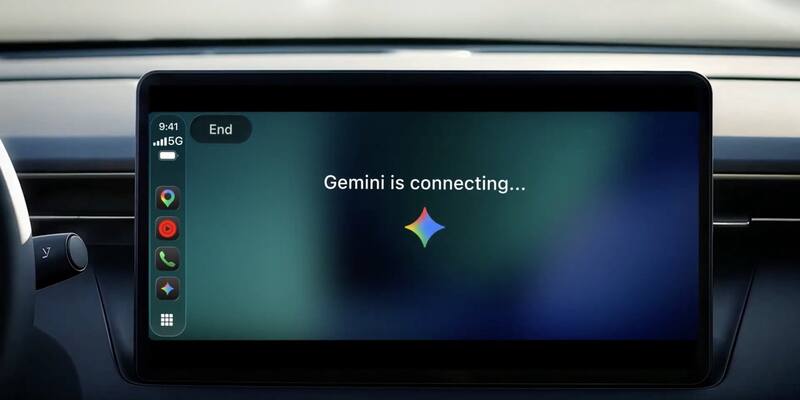
Google’s launch artwork for the Gemini app on Apple CarPlay, November 11, 2026. Image: Google
Google’s AI assistant now has its own button on Apple’s car dashboard. Google said on Wednesday it is rolling out the Gemini app on Apple CarPlay, letting iPhone owners hold hands-free, back-and-forth voice conversations with Gemini Live from the car’s screen, a rival to Siri on Apple’s own platform. It is reaching all Gemini users on iOS worldwide, starting today.
How Gemini works on CarPlay
Gemini appears as an app icon on the CarPlay home screen and in the side rail. Tapping it lets you pick up a recent chat or start a fresh one. Google says it designed the app as a “conversational driving companion that minimizes distraction”, so there is very little on screen.
9to5Google, which saw the new interface, describes a simple waveform that shows when Gemini is listening, thinking and responding, with “End” and “Mute” buttons in the top-left corner. As on the phone, you can cut Gemini off mid-answer to add a detail, change the subject, or pause while you concentrate on a junction or an exit.
Everything said in the car syncs with the Gemini app on your iPhone, so summaries, notes and ideas from the drive are waiting in your chat history once you park.
What you can ask it while driving
Google pitches the feature at the commute, which it says averages about an hour behind the wheel for millions of people. Its examples fall into four groups:
- Planning the day: what is on your calendar, when to leave for your next appointment, or help preparing for a meeting.
- Working through your inbox: through Gmail and Google Calendar, Gemini can read out your Daily Brief, catch you up on unread email, summarise long threads and take a reply by voice.
- Local tips: a quick lunch spot near your route, or the story behind a landmark you are passing.
- Thinking out loud: rehearsing a presentation or a difficult conversation, including asking Gemini to play a sceptical boss, or having a complex topic such as solid-state EV batteries explained simply.
Who gets it and how to switch it on
Google says Gemini on CarPlay is rolling out globally to all Gemini users on iOS, in every language Gemini Live supports, so it covers free and paid accounts in the US, UK, Canada, Australia, Germany and beyond. Google hasn’t said whether CarPlay chats count towards the app’s usage limits, and it doesn’t list a minimum iOS version or specific car models: any car with CarPlay should do.
To get started:
- Update the Gemini app on your iPhone to the latest version.
- Allow microphone access, and use Gemini Live on the phone at least once.
- Connect the iPhone to your car, tap the Gemini icon on the CarPlay display and start talking.
One exception: the Daily Brief has to be switched on first, and Google says it and certain other personalisation features are not available to under-18s or to users in the European Economic Area (which includes Germany, France and the rest of the EU) or Nigeria. Drivers there still get the Gemini Live conversations.
Google’s Gemini, beside Apple’s Siri
The launch puts Google’s assistant one tap away from Apple’s own on Apple’s own screen. That is an awkward pairing for Apple, since the new Siri AI is itself built with Google’s Gemini. Apple has spent the autumn adding to it, from new languages in iOS 27.2 to skills that any app can teach it, while many iPhone owners are still on the Siri AI waitlist.
It is also Google’s second Gemini step onto CarPlay in a month. On October 21 Gemini arrived inside Google Maps on CarPlay for conversational help with navigation; the new app goes further, with general chat, email and calendar. Google had already brought Gemini to Android Auto and cars with Google built-in.
Why it matters
The car is one of the few places people still talk to an assistant every day, and on iPhone that has always meant Siri. Putting Gemini Live on CarPlay gives drivers a free, full AI chatbot with access to their Gmail and calendar, and makes Apple’s dashboard a place where Google competes directly with the assistant it helped build.
Sources: Google, 9to5Google.
Latest Google news